
Introduction
Have you ever wondered how a mobile application gets data from a server? For example:
- How does an e-commerce app display products?
- How does Google Maps show location information?
- How does a payment application process transactions?
- How does Instagram load posts and comments?
- How does a weather application show live weather information? The answer is simple:
API
API is one of the most important concepts in modern software development. Whether you are learning Java, Spring Boot, Python, JavaScript, React, Android, Flutter, or Microservices, understanding APIs is essential.
In this article, we will learn API from the basics in simple language.
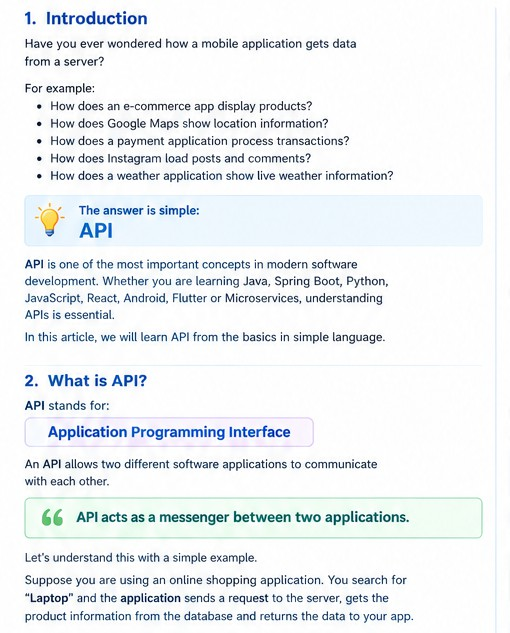
API stands for:
Application Programming Interface
An API allows two different software applications to communicate with each other. In simple words:
API acts as a messenger between two applications.
Let’s understand this with a simple example.
Suppose you are using an online shopping application. You open the application and search for:
Laptop
The application sends a request to the server.
The server processes the request and gets product information from the database. Then the data is returned to your application.
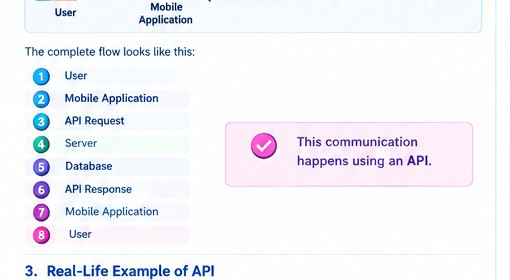
The complete flow looks like this:
User
↓
Mobile Application
↓
API Request
↓
Server
↓
Database
↓
API Response
↓
Mobile Application
↓
User
This communication happens using an API.
Real-Life Example of API
Restaurant waiter example of an API
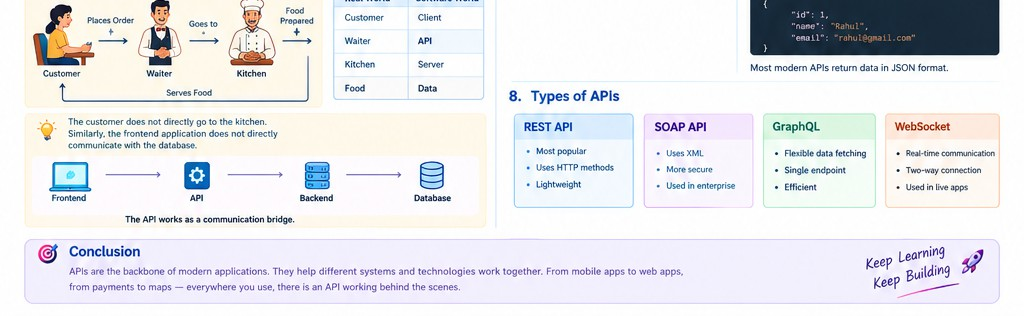
Let’s understand API with a restaurant example. Imagine you visit a restaurant.
There are three important parts:
- Customer
- Waiter
- Kitchen
The flow is:
Customer
↓
Places Order
↓
Waiter
↓
Kitchen
↓
Food Prepared
↓
Waiter
↓
Customer
Here:
| Real World Software World | |
| Customer | Client |
| Waiter | API |
| Kitchen | Server |
| Food | Data |
The customer does not directly go to the kitchen.
Similarly, the frontend application does not directly communicate with the database. Instead:
Frontend
↓
API
↓
Backend
↓
Database
The API works as a communication bridge.
Why Do We Need APIs?
Frontend backend mobile database architecture
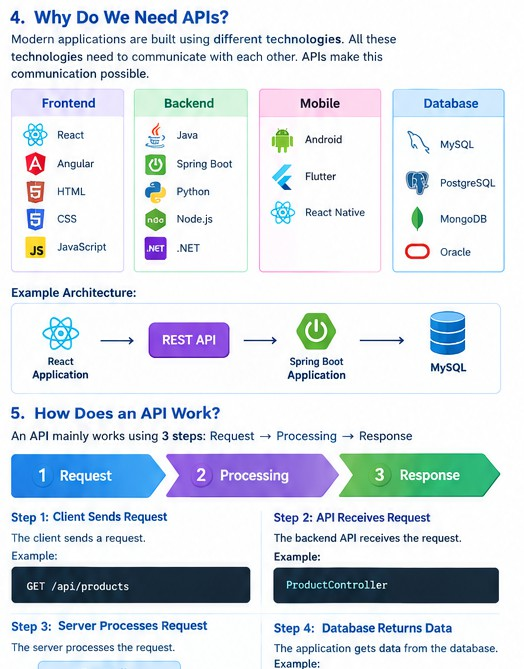
Modern applications are built using different technologies. For example:
Frontend React Angular HTML CSS
JavaScript
Backend Java Spring Boot Python Node.js
.NET
Mobile Android Flutter React Native
Database
MySQL
PostgreSQL MongoDB Oracle
All these technologies need to communicate with each other. APIs make this communication possible.
For example:
React Application
↓
REST API
↓
Spring Boot Application
↓
MySQL
How Does an API Work?
An API mainly works using:
- Request
- Processing
- Response
Let’s understand this step by step.
Step 1: Client Sends Request
The client sends a request. Example:
GET /api/products
Step 2: API Receives Request
The backend API receives the request. Example:
ProductController
Step 3: Server Processes Request
The server processes the request.
Controller
↓
Service
↓
Repository
Step 4: Database Returns Data
The application gets data from the database. Example:
Product Laptop
Mobile Keyboard
Step 5: API Sends Response
The API sends the response to the client. Example:
[
{
“id”: 1,
“name”: “Laptop”, “price”: 50000
},
{
“id”: 2,
“name”: “Mobile”, “price”: 20000
}
]
What is an API Request?
An API Request is sent by the client to get or send data. Example:
GET
http://localhost:8080/api/employees
The request contains important information. For example:
URL
HTTP Method Headers Request Body
What is an API Response?
An API Response is returned by the server. Example:
{
“id”: 1,
“name”: “Test”,
“email”: “test@gmail.com“
}
Most modern APIs return data in JSON format.
What is JSON?
JSON stands for:
JavaScript Object Notation
JSON is a lightweight data format used to exchange information. Example:
{
“name”: “Chandrakant”, “technology”: “Java”, “experience”: “Fresher”
}
JSON is easy to:
- Read
- Write
- Understand
- Transfer
That is why REST APIs commonly use JSON.
What is REST API?
REST stands for:
Representational State Transfer
REST API is one of the most popular types of APIs.
REST APIs use HTTP methods to perform different operations. The most common methods are:
GET POST PUT DELETE
These methods are used for CRUD operations.
What is CRUD?
CRUD stands for:
| Operation Meaning HTTP Method | ||
| Create | Create new data | POST |
| Read | Get data | GET |
| Update | Update data | PUT |
| Delete | Delete data | DELETE |
Example:
Create Employee
↓
POST
Get Employee
↓
GET
Update Employee
↓
PUT
Delete Employee
↓
DELETE
GET API
GET is used to retrieve data. Example:
GET
/api/employees
Response:
[
{
“id”: 1,
“name”: “Test”
},
{
“id”: 2,
“name”: “Priya”
}
]
POST API
POST is used to create new data. Example:
POST
/api/employees
Request Body:
{
“name”: “Chandrakant”,
“email”: “chandrakant@gmail.com“, “salary”: 50000
}
Response:
{
“id”: 1,
“name”: “Chandrakant”,
“email”: “chandrakant@gmail.com“, “salary”: 50000
}
PUT API
PUT is used to update existing data. Example:
PUT
/api/employees/1
Request Body:
{
“name”: “Chandrakant Kardile”,
“email”: “kardile@gmail.com“, “salary”: 60000
}
DELETE API
DELETE is used to remove data. Example:
DELETE
/api/employees/1
The employee with ID 1 will be deleted.
API Architecture in Spring Boot :
A typical Spring Boot application follows this architecture:
CLIENT
↓
CONTROLLER
↓
SERVICE
↓
REPOSITORY
↓
DATABASE
Let’s understand every layer.
Controller Layer
The Controller receives HTTP requests. Example:
@RestController @RequestMapping(“/api/employees”) public class EmployeeController {
}
Service Layer
The controller handles requests such as:
GET POST PUT DELETE
The Service layer contains business logic. Example:
@Service
public class EmployeeService {
}
The flow is:
Controller
↓
Service
↓
Repository
Business logic should generally be written inside the Service layer.
Repository Layer
The Repository communicates with the database. Example:
public interface EmployeeRepository extends Jpa Repository<Employee, Long> {
}
Spring Data JPA provides useful methods such as:
save() findAll() findById() deleteById()
Entity Layer
An Entity represents a database table. Example:
@Entity
public class Employee {
@Id
private Long id;
private String name;
private String email;
}
This can represent a database table like:
| ID Name Email | ||
| 1 | Chandrakant | chandrakant@gmail.com |
| 2 | Priya | priya@gmail.com |
API Example Using Spring Boot
Let’s create a simple Employee API.
Employee Controller
@RestController @RequestMapping(“/api/employees”) public class EmployeeController {
@GetMapping
public String getEmployees() {
return“Employee List”;
}
}
Now run your Spring Boot application. Open:
http://localhost:8080/api/employees
You will get:
Employee List
API Endpoint
An API Endpoint is a URL where an API can be accessed. Example:
/api/employees
Complete URL: http://localhost:8080/api/employees
Another example: http://localhost:8080/api/products
Different endpoints perform different operations. Example:
GET
/api/products Get all products. GET
/api/products/1 Get product by ID. POST
/api/products
How to Test APIs?
API testing tools
APIs can be tested using different tools. Popular API testing tools include: Postman
Swagger Insomnia
Testing API Using Postman
Suppose your API URL is: http://localhost:8080/api/employees Select:
GET
Click:
Send
You will receive the API response. For POST API:
Select:
POST
Then go to:
Body
↓
raw
↓
JSON
Enter:
{
“name”: “test”,
“email”: “test@gmail.com“
}
Click:
Send
The data will be sent to your backend API.
HTTP Status Codes
HTTP Status Codes tell us whether the API request was successful or not.
200 – OK
The request was successful.
200 OK
201 – Created
New data was successfully created. Example:
Employee Created
400 – Bad Request
The request contains invalid data. Example:
Invalid Email
401 – Unauthorized
Authentication is required. Example:
Invalid Token
403 – Forbidden
The user does not have permission. Example:
Access Denied
404 – Not Found
The requested resource does not exist. Example:
Employee Not Found
500 – Internal Server Error
An error occurred on the server. Example:
Database Error
API Authentication
Some APIs are public.
Example:
GET /api/products
Anyone can access them.
But some APIs contain sensitive information. Example:
GET /api/bank-account
These APIs require authentication.
Common authentication methods include:
Basic Authentication JWT Token
OAuth API Key
What is an API Key?
An API Key is a unique key used to identify an application. Example:
API_KEY = XXXXXX
Some external services provide API Keys. For example:
Weather API Google Maps API Payment API
The API key helps the service identify who is using the API.
What is JWT?
JWT stands for:
JSON Web Token
JWT is commonly used for authentication. The flow looks like this:
User Login
↓
Username + Password
↓
Server
↓
JWT Token Generated
↓
Client
↓
Send Token with Request
↓
Access Protected API
Example:
Authorization:
Bearer JWT_TOKEN
JWT is widely used in Spring Boot applications.
Real-World Examples of APIs
APIs are used everywhere.
E-Commerce API
Examples:
Product API Order API Payment API Customer API
Banking API
Examples:
Account API Transaction API Payment API Customer API
Food Delivery API
Examples:
Restaurant API Menu API Order API Payment API
Social Media API
Examples:
User API Post API Comment API
Like API
Weather API
Example:
GET /api/weather
Response:
{
“city”: “Mumbai”, “temperature”: 30, “weather”: “Cloudy”
}
REST API Request Flow
Let’s understand the complete API flow.
User
↓
Frontend Application
↓
API Request
↓
Controller
↓
Service
↓
Repository
↓
Database
↓
Repository
↓
Service
↓
Controller
↓
JSON Response
↓
Frontend
↓
User
This is the basic flow of many backend applications.
Advantages of APIs
- Communication
APIs allow different applications to communicate.
- Reusability
The same API can be used by:
Web Application Mobile Application Desktop Application
- Security
APIs can provide controlled access to data.
- Scalability
Applications can be divided into different services. Example:
User Service Order Service Payment Service
- Integration
APIs help integrate external services. Examples:
Payment Gateway Google Maps Email Service SMS Service
API vs Web Service
Many beginners confuse API and Web Service.
API
API is a communication interface between applications. An API can work using different technologies.
Web Service
A Web Service is a type of API that works over a network. Simple understanding:
All Web Services are APIs
But not all APIs are Web Services
REST API vs SOAP API
| REST API | SOAP API |
| Lightweight | Heavy |
| Usually uses JSON | Uses XML |
| Easy to use | More complex |
| Faster and flexible | More structured |
| Popular for modern applications | Common in some enterprise systems |
REST APIs are widely used in modern web and mobile applications.
API Best Practices
When developing APIs, follow these best practices.
Use Meaningful URLs
Good:
/api/employees
Avoid:
/getEmployeeData
Use Proper HTTP Methods
Use:
GET → Read
POST → Create PUT → Update DELETE → Delete
Use Proper Status Codes
Example:
200 → Success
201 → Created
400 → Bad Request
404 → Not Found
500 → Server Error
Use JSON Format
Example:
{
“name”: “Rahul”
}
JSON is easy to use and widely supported.
Handle Exceptions
Your API should handle errors properly. Examples:
Employee Not Found Invalid Request Database Error
Secure Sensitive APIs
Use:
JWT
OAuth API Keys
when authentication and authorization are required.
Common API Mistakes Beginners Make
- Writing Everything in Controller
Avoid this:
Controller
↓
Database
Use proper architecture:
Controller
↓
Service
↓
Repository
↓
Database
- Using Wrong HTTP Methods
Avoid:
GET /deleteEmployee/1
Use:
DELETE /api/employees/1
- Not Handling Errors
Always return meaningful error responses.
- Returning Sensitive Information
Never expose:
Passwords Secret Keys Private Tokens
Sensitive Account Information
API Learning Roadmap for Beginners
If you want to become a Backend Developer, follow this roadmap.
Programming Basics
↓
Core Java
↓
OOP Concepts
↓
Collections
↓
Exception Handling
↓
SQL
↓
Spring Framework
↓
Spring Boot
↓
REST API
↓
CRUD API
↓
Spring Data JPA
↓
Exception Handling
↓
Validation
↓
DTO
↓
Spring Security
↓
JWT
↓
Microservices
Conclusion
API is one of the most important concepts in modern software development. An API allows different applications to communicate with each other.
In this article, we learned:
- What is API?
- How API works
- API Request and Response
- JSON
- REST API
- HTTP Methods
- CRUD Operations
- API Architecture
- API Endpoints
- API Testing
- HTTP Status Codes
- API Authentication
- JWT
- API Best Practices
- API Interview Questions
- API Learning Roadmap
If you want to become a successful Java or Backend Developer, understanding APIs is extremely important.
Start with basic APIs.
Then learn:
REST API CRUD API
Spring Boot Database DTO
Exception Handling Validation
JWT
Microservices
The best way to learn APIs is by building projects. Start with simple projects such as:
Employee Management System Student Management System Product Management System Library Management System
Then move to advanced applications.
Keep learning, keep building projects, and keep preparing for your dream IT job!