Imagine a fresher called Chandrakant. He builds a to-do app in React in just two hours. He asked an AI tool for the full code, pasted it, got a few errors, asked the AI to fix them, and it worked. He feels great.
Then comes the interview. The interviewer asks, “Can you explain how useEffect works in your app?” Chandrakant goes blank. He built the app, but he never really learned how it works.
This is the biggest risk of AI coding tools for freshers. They are very helpful, but if you use them in the wrong way, you finish your project and lose your learning. In this post, you will learn how to use AI tools the smart way, so you get the speed of AI and the skills of a real developer.
Quick answer: Use AI like a tutor, not like a machine that gives you ready-made code. Try first, ask for hints and explanations, type the code yourself, debug on your own first, and test yourself at the end.
Why this matters in 2026
AI coding tools are now part of everyday developer work. As a fresher, you will be expected to use them. But companies also expect you to understand the code you ship, and many coding tests and interviews still check your own skills.
There is also research on this. In January 2026, researchers at Anthropic (the company that makes Claude) published a randomized study on how AI help affects learning. Developers had to learn a new Python library, one group with an AI assistant and one group without. Then everyone took a quiz without AI. Here is what they found:
- The group that used AI scored about 50% on the quiz. The group that coded by hand scored about 67%.
- The biggest gap was in debugging questions.
- On average, the AI group was not significantly faster. Some people spent a lot of time just talking to the assistant.
- How people used AI mattered a lot. People who asked for explanations and asked follow-up questions scored 65% to 86%. People who handed the whole task to AI, slowly depended on it more, or kept asking it to fix bugs scored only 24% to 39%.
A 2024 study at the University of Maribor, where 32 students learned React over 10 weeks, reported a similar pattern.
One important point: this research is about learning something new. It does not say AI is bad. It says that how you use AI decides whether you learn or not.
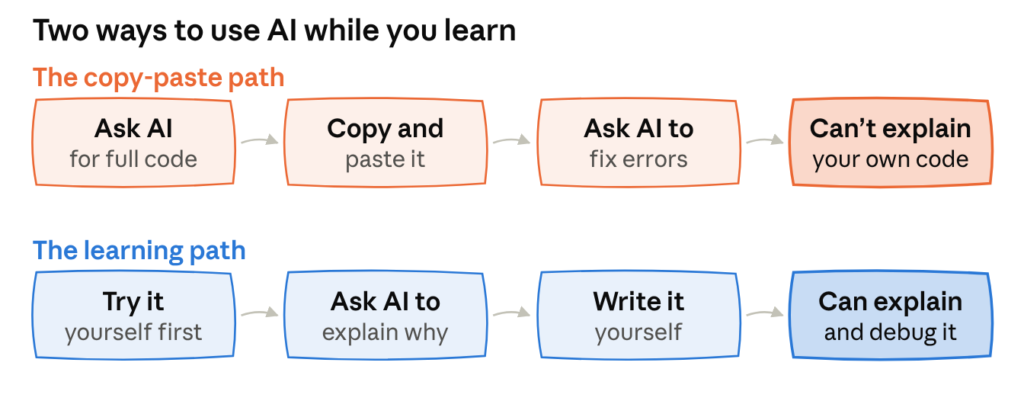
the copy-paste path vs the learning path
What are AI coding tools?
There are two main types:
- Chat assistants: You ask a question and get an answer, like ChatGPT, Claude or Gemini.
- Code editor assistants: They suggest or write code inside your editor, like GitHub Copilot or Cursor.
Both are useful. Both can be misused. The rules below work for any of them.
The golden rule
Let AI explain, not just produce.
If AI only gives you finished code, your brain does no work, and no work means no learning. If AI helps you understand, you learn faster than you would alone. Some AI tools now even have learning or study modes that explain things step by step instead of handing over the answer. Try them.
7 rules to use AI without hurting your learning
Rule 1: Try first for 10 to 15 minutes
Before you open any AI tool, try the problem yourself. Even if you get it wrong, your brain now knows what you are looking for, so the explanation sticks better.
Example: You want to build a login form in React. First write the form, the input fields and the state yourself. Then ask AI to review it.
Rule 2: Ask for the smallest help first
Do not jump straight to “give me the full code”. Go up the ladder one step at a time, and stop as soon as you are unstuck.
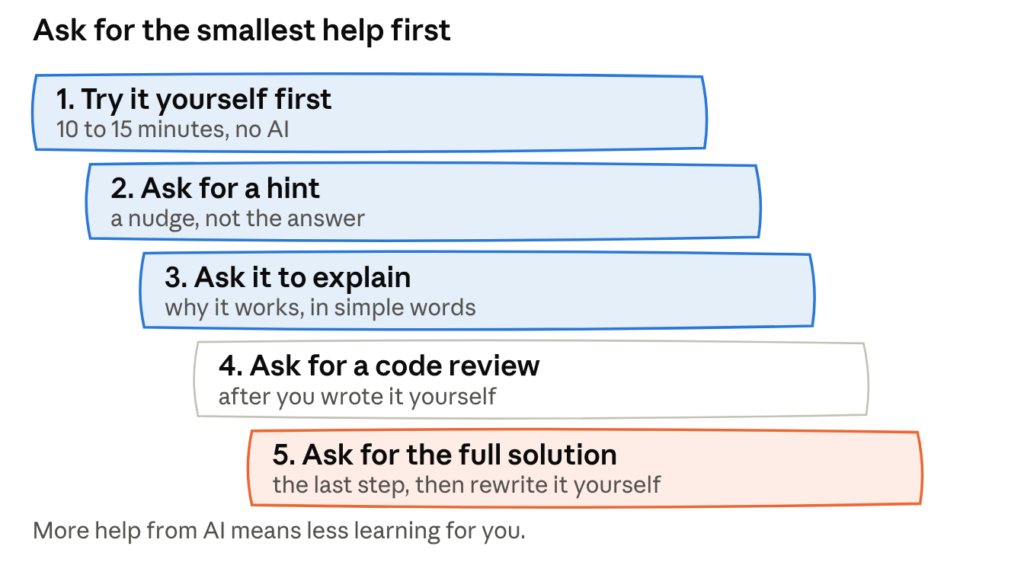
five levels of help from AI
Example prompt: “I am stuck on this problem. Give me a hint, not the full solution.”
Rule 3: Ask “why”, not just “how”
After AI gives you something, ask why it works. This one habit changes everything.
Example prompts:
- “Explain why this works, as if I am a beginner.”
- “What would happen if I removed this line?”
- “What is the difference between this and the way I wrote it?”
Rule 4: Type the code yourself
Do not copy and paste big blocks. Read the code, close the AI window and write it yourself. Change the variable names. Typing forces you to notice every line.
Rule 5: Debug on your own first
This is where the study found the biggest learning gap, so it matters a lot. When you get an error:
- Read the error message fully. The first line usually tells you what is wrong, and the stack trace tells you where.
- Use console.log (JavaScript) or print statements and breakpoints (Java) to see what is happening.
- Give yourself 15 minutes.
- Then ask AI to explain the error, not to fix it.
Every bug you solve yourself makes you a better developer. Every bug AI solves for you is a lesson you skipped.
Rule 6: Use the 3-question test before you keep any AI code
Before you accept any code from AI, ask yourself three questions.
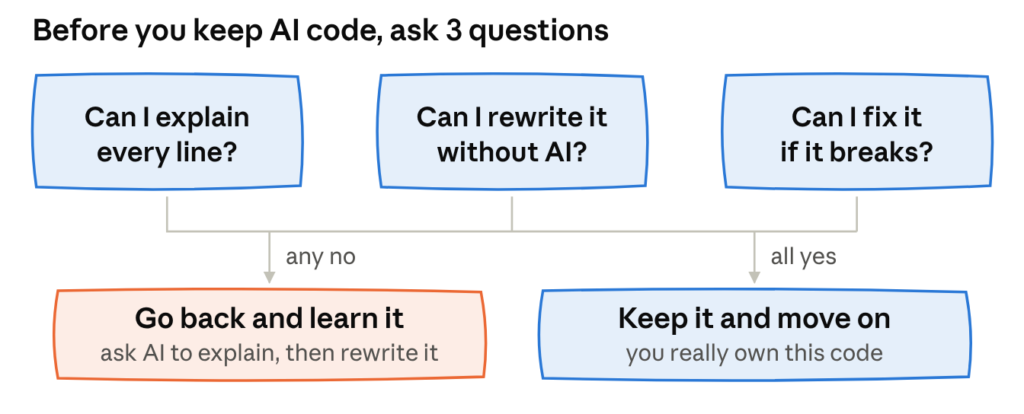
the 3-question test
If the answer to any of them is no, do not move on. Ask AI to explain it, then write it again yourself.
Rule 7: Test yourself at the end of the session
Close the AI tool and try to rebuild the same feature from memory. Or ask the AI to quiz you:
“Ask me 5 questions about what we just built, one at a time. Wait for my answer and then correct me.”
This is the same as revision for an exam, and it works.
Real examples: bad prompts vs better prompts
| Situation | Bad prompt | Better prompt |
| React component keeps re-rendering | “Fix my code” | “My component re-renders forever. Don’t give me the fixed code. Tell me which concept I should check and ask me a question that helps me find the cause.” |
| Spring Boot NullPointerException | “Fix this error” (and paste the whole log) | “I read the stack trace and the error is on line 42 of my UserService. What does this exception mean, and what are 3 common reasons for it?” |
| SQL join homework | “Write the query” | “Here is my query. It returns duplicate rows. Review it and explain what is wrong, but let me fix it.” |
| Learning a new topic | “Explain Docker” | “Explain Docker with a real-life example, then give me a small exercise to try myself.” |
| DSA problem | “Give me the solution” | “I tried for 30 minutes. This is my approach. Give me one hint to move forward.” |
| Interview preparation | “Give me Java interview questions” | “Ask me one Java collections question at a time. Wait for my answer, then tell me what I missed.” |
A full example, step by step
Say you are building the “add to cart” feature in a React shopping app.
- You try first: You write a button and a useState array for cart items. The cart does not update when you click.
- You debug: You add a console.log and find that you are changing the array directly.
- You ask for a hint: “My cart state does not update when I push an item. Give me a hint about what concept I should read.”
- AI hints: It tells you that React state should not be changed directly, and points you to creating a new array.
- You fix it yourself with the spread operator.
- You ask why: “Why does React need a new array and not the same one?”
- You test yourself later: The next day you build a wishlist feature without AI.
This took longer than copying the answer. But now you actually know how state updates work, and an interviewer cannot trick you with it.
Where it is fine to use AI more freely
AI is great when the task is boring or repeated, and you already understand the idea:
- Writing repetitive boilerplate code
- Formatting code and fixing small style issues
- Writing unit tests for code you understand
- Writing a README or code comments
- Explaining unfamiliar code from a project or open-source repo
- Creating sample data for testing
A simple way to decide: if you are learning the skill, do the thinking yourself. If you already know the skill, let AI speed you up.
What to do in different situations
| Situation | Do this | Avoid this |
| Learning a new topic | Ask for explanations and small examples | Asking for a full project on a topic you do not know |
| Doing a college project | Plan the design yourself, use AI to review | Generating the whole project and submitting it |
| Getting an error | Read it, debug it, then ask what it means | Pasting it and applying the fix without reading |
| Solving DSA problems | Try for 30 minutes, then ask for a hint | Reading the full solution straight away |
| Writing boilerplate or tests | Use AI after you understand the logic | Using it for logic you cannot explain |
Stay safe while using AI tools
- Check the code. AI can write code that looks right but has bugs or security problems, like passwords written directly in the code.
- Check that libraries exist. AI sometimes invents a package or method that does not exist. Look it up in the official documentation.
- Never paste private data. Do not paste company code, API keys, passwords or customer data into public AI tools.
- Follow your college and company rules. Some assignments and workplaces limit AI use. Be honest about where you used it.
What interviewers see
If you built a project with a lot of AI help, interviewers will find out quickly. They ask things like:
- “Walk me through this part of your code.”
- “Why did you choose this approach?”
- “What happens if this API returns an error?”
- “Can you change this feature right now?”
Many online coding tests and live rounds are also done without AI. Rahul’s problem at the start of this post is exactly this. If you can explain your project clearly, it does not matter that AI helped you. If you cannot, it does matter.
A 4-week plan to build the habit
| Week | What to do |
| 1 | Follow the 15-minute rule: always try yourself before asking AI |
| 2 | Only ask for hints and explanations, not for full solutions |
| 3 | At the end of each day, rebuild one small feature from memory |
| 4 | Explain one of your projects out loud to a friend, line by line |
After four weeks, this will feel natural.
Common mistakes freshers make
- Copy-pasting whole files from AI and never reading them
- Asking AI to fix every error without reading the message
- Skipping the basics like JavaScript, Java and SQL because AI can “just write it”
- Using AI on your DSA practice, which removes the exact thinking that interviews test
- Trusting the output without checking it
- Hiding AI use, instead of being honest and showing that you understood the code
FAQ
Should beginners avoid AI completely? No. Used well, AI is like a patient tutor available at any time. The point is to use it for understanding and not for skipping the thinking.
Is using AI for coding cheating? It depends on the rules of your college or company. For personal learning projects, it is not cheating. For exams and assignments, follow the rules, and be honest.
Which AI tool is best for learning? The habits matter more than the tool. Choose any tool you like, and look for a learning or study mode if it has one.
How do I mention AI skills on my resume honestly? Write what you built and how you checked it. For example: “Built a task manager with React and Spring Boot. Used AI tools to review code and write tests, and tested all features manually.” Do not write “ChatGPT” as a skill.
Will AI replace freshers? Nobody can say for sure. What we can say is that people who can build and also understand their code, and use AI well, are in a stronger position than people who only paste.
Final words
Here is the whole post in one line: AI should make you a stronger developer, not a faster copy-paster.
Try first, ask for hints, ask why, type the code yourself, debug before you ask, use the 3-question test and check yourself at the end. Do these seven things, and you get both the speed of AI and the skills that interviews test.
If this post helped you, share it with a friend who is learning to code. If you have any questions, ask in the comments.