You open your bank app and it shows your account. But it never shows anyone else’s account. Two different checks happened behind the scenes. One check found out who you are. The other check decided what you are allowed to do.
These two checks are called authentication and authorization. Almost every beginner mixes them up, and interviewers love to ask about them. In this post, I will explain both in simple words, with real examples from apps you use every day, and then show how they work in a real web app with React and Spring Boot.
Quick answer: Authentication checks who you are. Authorization checks what you are allowed to do. Authentication always comes first.
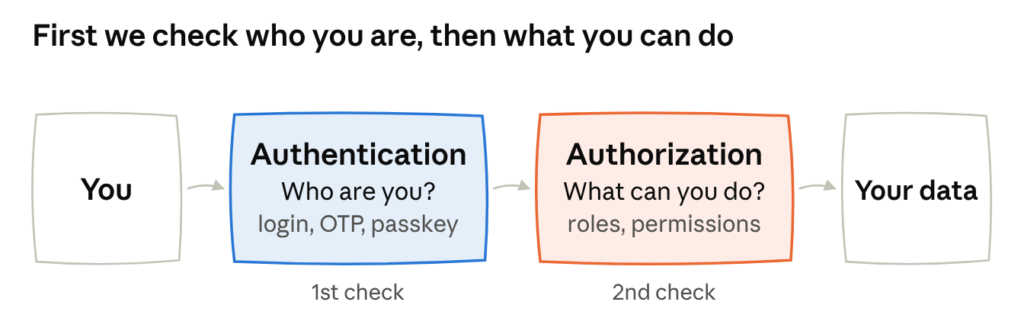
authentication first, then authorization
What is authentication?
Authentication means proving your identity. The system asks, “Who are you?” and you have to give proof.
There are three common types of proof:
- Something you know: password, PIN
- Something you have: OTP on your phone, security key, authenticator app
- Something you are: fingerprint, face scan
When a system asks for two or more of these together, it is called multi-factor authentication (MFA). For example, a password plus an OTP.
There is also a newer way called passkeys. A passkey lets you log in with your fingerprint, face or phone lock instead of typing a password. The FIDO Alliance, in its State of Passkeys 2026 report, estimates that about 5 billion passkeys are now in use worldwide. So this is not a future idea anymore.
What is authorization?
Authorization means deciding what an authenticated user is allowed to do. The system asks, “Now that I know who you are, what can you access?”
Authorization usually depends on:
- Your role: admin, editor, viewer, customer
- Your permissions: read, edit, delete, approve
- Ownership: is this data yours or someone else’s?
You cannot do authorization properly without authentication. If the system does not know who you are, it cannot decide what you are allowed to do.
Real-life examples (without technology)
- Office building: The guard checks your ID card at the gate. That is authentication. Your access card then opens only your floor, not the server room. That is authorization.
- Airport: The staff checks your passport at check-in. That is authentication. Your boarding pass decides which flight you can board. That is authorization.
- Hotel: The reception checks your ID when you arrive. That is authentication. The room key opens only your room. That is authorization.
Real examples from apps you use every day
| App | Authentication (Who are you?) | Authorization (What can you do?) |
| UPI app like PhonePe or Google Pay | UPI PIN or fingerprint to open the app and pay | You can see only your own transactions, and payments follow your limits |
| Google Docs | Sign in with your Google account | The owner can edit and share. A Viewer can only read. A Commenter can only comment |
| College portal | Student ID and password | A student sees their own marks. A teacher enters marks. An admin manages users |
| Food delivery app | Phone number and OTP | A customer places orders. A restaurant manages its menu. A delivery partner sees only assigned orders |
| Username and password, or a passkey | You can edit or delete only your own posts |
See the pattern? Login is always authentication. Everything that decides what you can see or do after login is authorization.
Authentication vs authorization: the main differences
| Point | Authentication | Authorization |
| Question it answers | Who are you? | What can you do? |
| Order | Happens first | Happens after authentication |
| What it uses | Password, OTP, fingerprint, passkey | Roles, permissions, policies |
| Who sees it | The user sees it (login screen) | Mostly works in the background |
| Who can change it | You can change your own password | An admin or the system owner sets your permissions |
| If it fails | HTTP 401 | HTTP 403 |
| Example | Logging in to your account | Seeing the admin page only if you are an admin |
HTTP 401 vs 403: a common confusion
Developers search for this a lot, and the names are confusing.
| Status code | What it really means | Example |
| 401 Unauthorized | You are not authenticated. No token, wrong token or expired token | Calling an API without logging in |
| 403 Forbidden | You are authenticated, but you are not allowed | A normal user calling an admin API |
The name “401 Unauthorized” is a bit misleading, because it is really about authentication. Remember it like this: 401 means “I don’t know who you are”, and 403 means “I know who you are, but you can’t do this”.
How authentication and authorization work in a real web app
Let us follow a login in a React and Spring Boot app, step by step:
- The user types an email and password in the React login form.
- React sends them to the backend, for example POST /api/auth/login.
- The backend finds the user in the database and checks the password. Passwords are stored as hashes (for example with BCrypt), never as plain text.
- If the password is correct, the backend creates a token, usually a JWT, that contains the user id and role. This is the authentication part.
- React stores the token and sends it with every request in the Authorization: Bearer <token> header.
- On every request, the backend checks that the token is valid and not expired. This is authentication again.
- Before running the action, the backend checks if this user’s role is allowed to do it. For example, only an admin can delete users. This is the authorization part.
- If the role is allowed, the backend returns the data. If not, it returns 403.
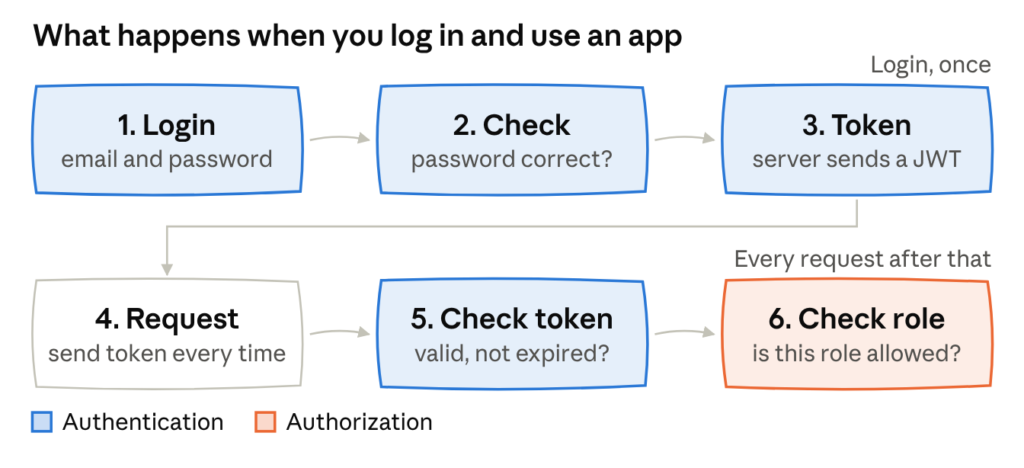
login and protected request flow
Common ways to do authentication
- Username and password: the most common one. Always hash the passwords.
- OTP and MFA: adds a second proof, like an SMS or app code.
- Biometrics: fingerprint or face unlock on phones.
- Social login: “Login with Google”. It uses OAuth 2.0 and OpenID Connect (explained below).
- Passkeys: log in with your device lock, and nothing to remember or type.
Session or JWT?
| Point | Session | JWT |
| Where login info lives | On the server | Inside the token the client holds |
| Scaling | Servers need to share session storage | Easier to scale, because the server stores nothing |
| Logout | Delete the session on the server | Token stays valid until it expires, unless you keep a blocklist |
| Good for | Traditional websites | APIs, mobile apps, React with Spring Boot |
One important thing about JWT: it is signed, not encrypted. Anyone can read what is inside it. So never put passwords or other secret data in a JWT.
Common ways to do authorization
1. Role-based access control (RBAC). You give each user a role, and each role has fixed permissions. This is the most common model.
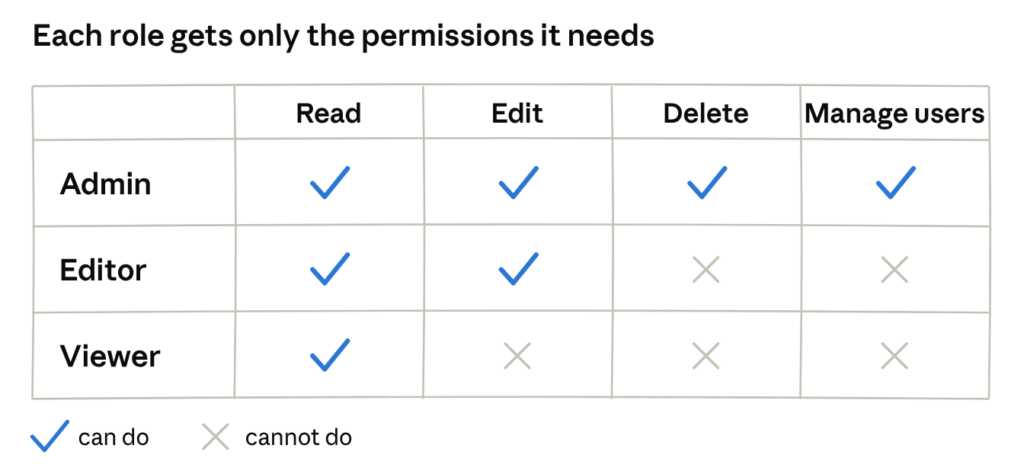
role-based access control example
2. Attribute-based access control (ABAC). The decision uses more details, like department, location or time. For example, “managers can approve expenses only for their own department”.
3. Ownership checks. The user can access a resource only if it belongs to them. For example, you can see order 101 only if order 101 is yours. Many real-world data leaks happen when developers forget this check.
OAuth 2.0 and OpenID Connect in simple words
These two names confuse everyone, so here is the short version.
- OAuth 2.0 is about authorization. It lets an app get limited access to your data without knowing your password. Think of a valet key for a car. It can start the car, but it cannot open the trunk. When an app asks, “Allow this app to see your Google Calendar?”, that is OAuth.
- OpenID Connect (OIDC) sits on top of OAuth 2.0 and adds authentication. It tells the app who you are. When you tap “Login with Google”, that is OIDC.
So OAuth 2.0 answers “what can this app access?”, and OIDC answers “who is this user?”.
A small code example: Spring Boot and React
Here is a simple Spring Security setup. It shows the three rules in a typical app: login is open to everyone, admin pages are only for admins, and everything else needs a logged-in user.
@Bean
SecurityFilterChain filterChain(HttpSecurity http) throws Exception {
http
.csrf(csrf -> csrf.disable())
.authorizeHttpRequests(auth -> auth
.requestMatchers(“/api/auth/**”).permitAll()
.requestMatchers(“/api/admin/**”).hasRole(“ADMIN”)
.anyRequest().authenticated()
);
return http.build();
}
In a real project you also add a JWT filter that reads the token and sets the logged-in user. Disabling CSRF is common for APIs that use tokens in headers, but not for apps that use cookie sessions.
You can also protect a single method:
@PreAuthorize(“hasRole(‘ADMIN’)”)
@DeleteMapping(“/api/users/{id}”)
public void deleteUser(@PathVariable Long id) { … }
And here is a protected route in React:
function AdminRoute({ user, children }) {
if (!user) return <Navigate to=”/login” />; // not logged in
if (user.role !== ‘ADMIN’) return <p>Access denied</p>; // logged in, but not allowed
return children;
}
Important: hiding a page in React only improves the user experience. A user can still call your API directly. The real permission check must always happen on the server.
Interview questions on authentication and authorization
1. What is the difference between authentication and authorization? Authentication verifies who you are. Authorization decides what you can do. Authentication comes first.
2. What is the difference between 401 and 403? 401 means the user is not authenticated. 403 means the user is authenticated but not allowed.
3. What is a JWT? A JSON Web Token has three parts: header, payload and signature. It is signed so it cannot be changed, but it is not encrypted, so anyone can read it.
4. Session-based vs token-based authentication? Sessions store the login state on the server. Tokens carry the login information with the client, so the server stays stateless.
5. What is RBAC? Role-based access control. Permissions are given to roles, and users get roles.
6. What is OAuth 2.0, and how is it different from OpenID Connect? OAuth 2.0 is for authorization, giving an app limited access to your data. OpenID Connect is built on top of it and adds authentication, so the app knows who the user is.
7. Why should passwords be hashed? If the database leaks, hashed passwords are not easy to read. Hashing with a slow algorithm like BCrypt also makes guessing much harder.
8. What is MFA? Multi-factor authentication means using two or more types of proof, like a password and an OTP.
9. Where should you store a JWT in the browser? Both ways have trade-offs. localStorage is easy but can be read if there is an XSS bug. An httpOnly cookie is safer from XSS, but then you need CSRF protection.
10. What is the principle of least privilege? Give each user only the access they need and nothing more.
Final words
Here is the whole post in two lines. Authentication is the login. Authorization is what the system lets you do after the login.
If you are building a project, add both properly. A project with login, roles, protected routes and ownership checks looks very strong on a fresher’s resume, and it gives you plenty to talk about in an interview.
If this post helped you, share it with a friend who is preparing for interviews. If you have any questions, ask in the comments.
Related posts: How to Become a Web Developer in 2026: Simple Roadmap, Spring Boot Interview Questions for Freshers, Top 50 Java Interview Questions