Every month, many students ask me the same thing: “I want to become a web developer. Where do I start?” There are too many courses, and everyone tells you something different. So most beginners get confused and quit in two weeks.
This post keeps things simple. You will see what to learn, in which order, and how long it takes. If you are preparing for IT placements, this list works for you too, because service companies and startups look for the same basic skills.
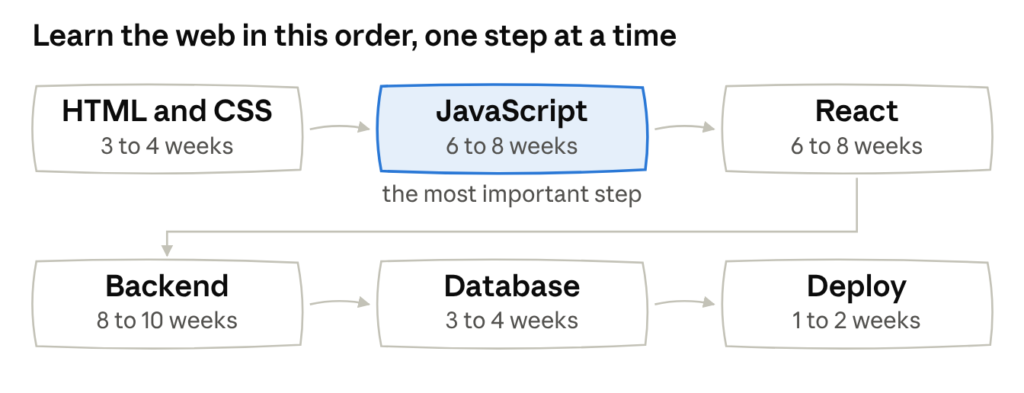
web developer roadmap · 6 steps
What does a web developer do?
A web developer builds websites and web apps. There are three types:
- Frontend developer: builds the part you see on the screen, like buttons, forms and page layouts.
- Backend developer: builds the part behind the screen, like login, saving data and payments.
- Full stack developer: does both. Freshers with this skill get the most job openings.
The easiest path is to start with frontend and then move to backend.
Step 1: Learn how the web works (1 week)
Do this before you write any code. Understand these basics:
- What happens between a browser and a server (request and response)
- What HTTP and HTTPS are
- What a domain name and DNS are
- The difference between frontend and backend
Interviewers often ask, “What happens when you type a URL in the browser?” This step helps you answer it.
Step 2: HTML and CSS (3 to 4 weeks)
HTML builds the structure of a page. CSS makes it look good.
Learn in HTML:
- Headings, paragraphs, links, images, lists and tables
- Forms and input fields
- Semantic tags like header, nav, main and footer
Learn in CSS:
- Colors, fonts and spacing (margin and padding)
- Flexbox and Grid for layouts
- Responsive design, so your site looks good on mobile and laptop
- Media queries
For practice, copy the layout of a simple landing page.
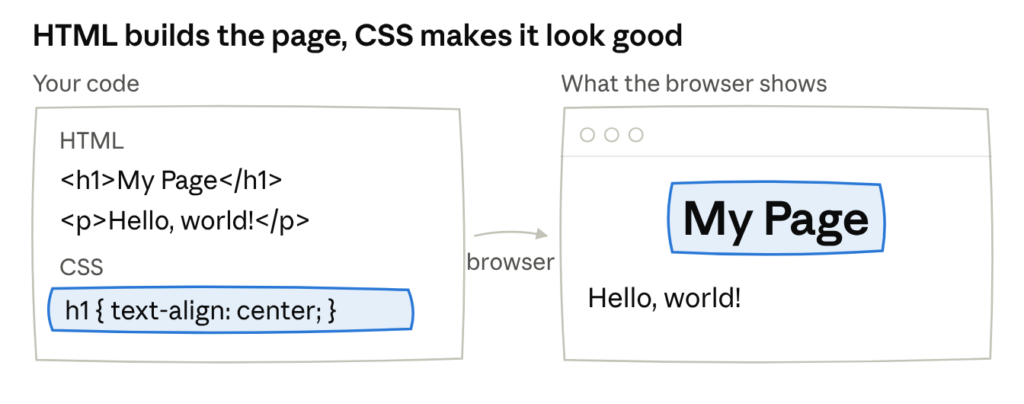
HTML code and what the browser shows
Step 3: JavaScript (6 to 8 weeks)
This is the most important step, and also the hardest. HTML and CSS make a page look nice. JavaScript makes it work. A button click, a form check, loading data from a server: all of this is JavaScript.
What to learn:
- Variables, data types, loops and functions
- Arrays and objects
- ES6 features (arrow functions, destructuring, spread operator)
- DOM and events
- Promises, async/await and the fetch API
Build 3 or 4 small projects here: a to-do app, a calculator, a weather app and a quiz app. Watching tutorials is not enough. You learn when you build things yourself.
Step 4: Git and GitHub (1 week)
Every company uses Git. Learn these commands: git init, git add, git commit, git push, git pull, git branch and git merge.
Upload all your projects to GitHub. Recruiters often check it.
Step 5: React JS (6 to 8 weeks)
Once JavaScript feels comfortable, learn React. It is the most used frontend library for jobs today.
What to learn:
- Components and props
- State and useState
- useEffect
- Lists, forms and conditional rendering
- React Router for multiple pages
- Calling APIs
- Context API
- Basic Redux or Zustand
Build one proper project, like an e-commerce frontend or a movie search app.
Step 6: Backend (8 to 10 weeks)
Now learn the server side. You have two good options:
- Java Spring Boot: Widely used in service companies like TCS, Infosys and Wipro. You need Core Java and OOPs first.
- Node.js with Express: You already know JavaScript, so it feels easier. Startups use it a lot.
Pick one and finish it. Do not try to learn both at the same time.
What to learn:
- How to build REST APIs (GET, POST, PUT, DELETE)
- Routes and controllers
- Login and security with JWT tokens
- Validation and error handling
- Connecting to a database
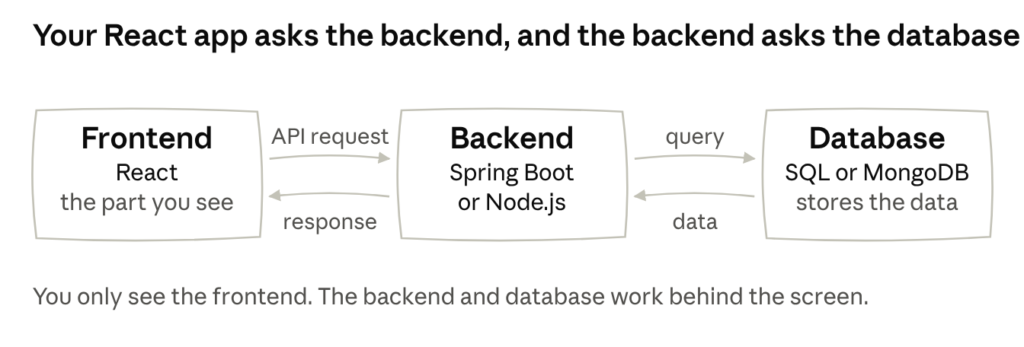
frontend, backend and database · request and response
Step 7: Databases (3 to 4 weeks)
A website needs a place to store its data.
- SQL (MySQL or PostgreSQL): tables, joins, primary and foreign keys, normalization. Placement interviews ask SQL questions all the time.
- MongoDB: learn this if you use Node.js.
Also spend a week or two on JPA/Hibernate (for Spring Boot) or Mongoose (for Node.js).
Step 8: Deployment (1 to 2 weeks)
A project that only runs on your laptop is not useful in an interview. Recruiters want a live link.
- Frontend: Vercel or Netlify (free)
- Backend: Render, Railway or AWS free tier
- Basics of Docker
A “Live Demo” link on your resume makes a good impression.
Step 9: DSA and problem solving (a little every day)
Do not skip this if you want a job. Coding tests and technical rounds in many companies include it.
Start with arrays, strings, hashmaps, linked lists, stacks, queues, sorting, searching and basic recursion. Solve 1 or 2 problems daily on LeetCode or HackerRank. Do this along with web development, not after it.
- LeetCode: https://leetcode.com
- HackerRank: https://www.hackerrank.com
Which projects should you build?
Projects matter more than certificates. These 3 are good for a resume:
- Portfolio website: your own personal site
- E-commerce app: products, cart, login and orders (full stack)
- Job portal or blog app: CRUD operations, login and an admin panel
Add real features. Do not just copy a tutorial project. Interviewers will ask, “What did you do in this project?” You should be able to explain every part.
Free resources
- freeCodeCamp: https://www.freecodecamp.org
- MDN Web Docs: https://developer.mozilla.org
- The Odin Project: https://www.theodinproject.com
- React official docs: https://react.dev
- Spring Boot guides: https://spring.io/guides
Final words
Becoming a web developer is not hard, but it needs patience. Learn a little every day, build projects, put your code on GitHub and practice mock interviews. After 6 months, you will see a big change in your skills.
If this roadmap helped you, share it with your friends. If you have any questions, ask in the comments.